



THERADOT Deep Oscillation Troubleshooting: No Output, Charging, Cables & Applicator Problems
If a Richmar THERADOT DO1009 will not turn on, shuts itself off, will not charge, produces no apparent output, feels inconsistent, or stops working with an applicator or electrode setup, the cause is often something that can be isolated before the unit is sent for service.
THERADOT is different from conventional TENS, NMES, and therapeutic ultrasound, so troubleshooting it using the rules for those modalities can lead clinicians in the wrong direction.
Three distinctions are especially important:
THERADOT requires a dry treatment surface.
Gray and white cables are not interchangeable at the accessory end.
The device cannot provide treatment while it is charging.
This guide focuses exclusively on operating problems and maintenance rather than duplicating the complete specifications and purchasing information already available on the Richmar THERADOT DO1009 product page.
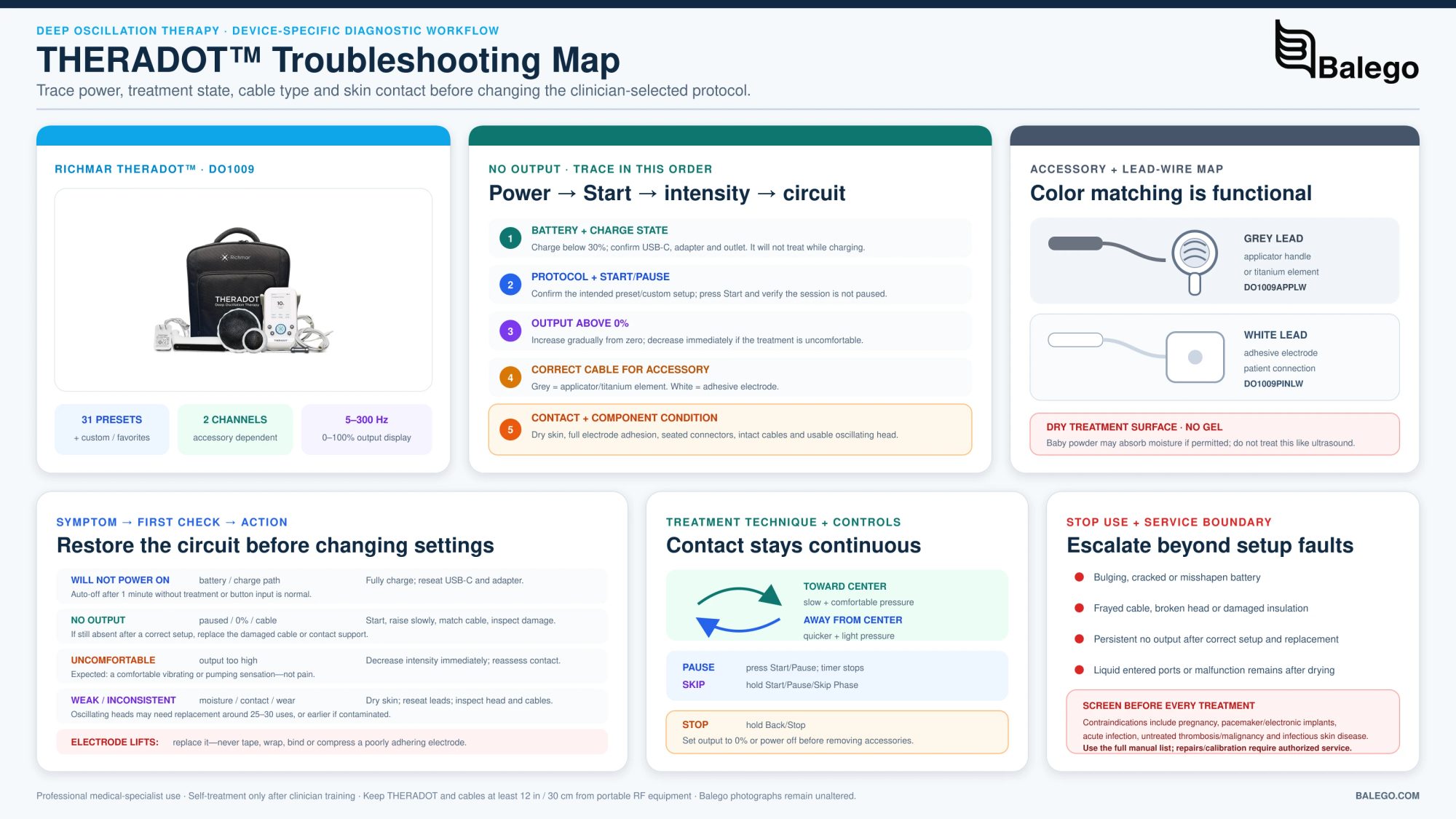
THERADOT Quick Troubleshooting Table
| Problem | Check first. | Likely corrective action |
|---|---|---|
| Will not turn on | Battery charge | Fully charge the device. |
| Turns off during setup | Was it idle for more than 1 minute? | Restart; automatic idle shutoff is normal. |
| Turns off during treatment | Battery level | Charge fully; consider battery condition if discharge is unusually rapid. |
| Will not charge | USB-C connection, adapter, outlet | Reconnect the charger and verify outlet power. |
| Won't work while plugged in | Is it charging? | Normal: THERADOT cannot operate while charging. |
| No output / no oscillation | Start status and output percentage | Press Start and raise output above 0%. |
| No output with applicator | Cable color | The applicator must use a gray lead. |
| No output with the titanium element | Cable color | The titanium element must use a gray lead. |
| No output with adhesive electrode | Cable color | The electrode must use a white lead. |
| Output seems weak or inconsistent. | Moisture, cables, electrode, oscillating head | Dry skin and inspect each accessory. |
| Treatment is uncomfortable | Output intensity | Reduce output immediately. |
| The electrode edge is lifting. | Adhesion | Replace the electrode; do not tape it down. |
| Applicator performance has deteriorated. | Head age and contamination | Inspect head; replacement may be needed. |
| Frequency/modulation cannot be changed in a preset. | Preset-program behavior | Normal—the preset permits timer adjustment only. |
| The device beeps between stages. | Timer/stage transition | Normal behavior |
| The problem persists after correct setup. | Accessory/device fault | Discontinue use and contact technical support. |
1. Why Won't My THERADOT Turn On?
The manufacturer's first troubleshooting step is straightforward:
Check the battery.
If there is no response after pressing and holding the power button, Richmar identifies a depleted battery as the likely cause.
The manual recommends charging the unit before treatment and states that a completely depleted battery should take approximately two hours to recharge under normal circumstances. Elsewhere in the battery-replacement section, Richmar allows a broader two-to-five-hour range for a completely depleted battery.
If a fully charged unit still does not power on, do not open the device to investigate internal electronics.
Richmar states that repairs and calibration must be performed by authorized service personnel, with battery replacement being the only stated user-serviceable exception.
2. Why Does THERADOT Turn Off by Itself?
An automatic shutoff during setup may be completely normal.
The manual says THERADOT powers off automatically when it is not delivering treatment and no button has been pressed for more than approximately one minute.
That means:
Turns off while sitting on a menu = possibly a normal idle timeout.
Turns off while actively treating = investigate further.
If shutdown occurs during treatment, verify battery level first.
A battery that begins losing power much more quickly than it did when new may be reaching the end of its useful life. Richmar specifically recommends battery replacement when the charge depletes rapidly or when the battery takes unusually long to recharge.
3. Why Won't My THERADOT Work While It Is Charging?
Because it is designed not to.
This is not a malfunction.
The THERADOT manual states explicitly that the device does not operate while its battery is charging. A charging icon should appear on the screen when the USB-C charging system is connected correctly.
For clinic workflow, this means the unit should be charged before the scheduled treatment rather than being plugged into AC power during use.
A good operating habit is to begin treatment with an adequate battery reserve instead of assuming the power cord can be connected if the battery level becomes low halfway through a session.
4. Why Won't THERADOT Charge?
If the charging symbol does not appear, work through the charging path rather than assuming the battery has failed.
Check:
| Charging component | What to inspect |
|---|---|
| USB-C connector | Fully seated in the device |
| Top sliding port cover | Positioned so the charging port is exposed |
| Power cable | No obvious damage |
| AC adapter | Properly connected |
| Wall outlet | Confirmed working |
| Battery behavior | Does the charge remain unusually low after sufficient time? |
An improperly connected adapter is the primary basic cause of failure to charge.
If the device begins requiring substantially longer charge times or discharges abnormally quickly, that points more toward battery deterioration than a simple connection problem.
Use only the manufacturer-specified replacement battery.
5. THERADOT Has No Output: Use This Sequence
The official manual identifies five primary causes:
Start has not been pressed → output remains at 0% → treatment is paused → cables are incorrectly connected → cable is damaged.
Use this order:
| Step | Check |
|---|---|
| 1 | Confirm the intended treatment method and program. |
| 2 | Confirm the accessory circuit is complete. |
| 3 | Verify the correct cable type. |
| 4 | Press Start. |
| 5 | Make sure treatment is not paused. |
| 6 | Raise output above 0%. |
| 7 | Inspect cables for damage |
| 8 | Inspect electrode or oscillating-head condition. |
| 9 | Stop and contact support if output remains absent. |
Do not begin troubleshooting by immediately raising the intensity.
A disconnected accessory or wrong lead is better corrected at the connection than compensated for with additional output.
6. White vs. Gray THERADOT Lead Wires
Both output sockets on top of the THERADOT can accept either cable, but the accessory determines which cable must be used.
| THERADOT accessory | Required cable |
|---|---|
| Adhesive electrode | White lead wire |
| Oscillating-head applicator | Gray lead wire |
| Titanium is a neutral element. | Gray lead wire |
The manufacturer identifies the white electrode lead as DO1009PINLW and the gray applicator/titanium lead as DO1009APPLW.
This distinction is easy to misunderstand because the two output ports themselves do not belong exclusively to one cable color.
The rule is
The port can accept either cable; the accessory cannot.
Richmar states that an applicator or titanium element must connect through a gray lead, while an electrode must connect through a white lead for the intended electrostatic output.
7. THERADOT Application Setups Compared
Troubleshooting is easier when you first identify which circuit you are using.
| Treatment setup | Clinician side | Patient side | Common failure point |
|---|---|---|---|
| Gloved-hand clinician treatment + electrode | Clinician electrode + vinyl gloves | Patient electrode | Poor electrode adhesion, wrong white lead |
| Gloved-hand clinician treatment + titanium element | Clinician electrode + vinyl gloves | The patient holds a titanium element. | Wrong gray lead to titanium element |
| Applicator + patient electrode | Oscillating-head applicator | Patient electrode | Applicator gray lead or electrode white lead |
| Applicator + titanium element | Oscillating-head applicator | The patient holds a titanium element. | One of the gray connections is incomplete. |
| Clinician-trained self-treatment | The patient uses an applicator. | Titanium element or electrode on opposite side | Wrong accessory/cable combination |
The manufacturer permits clinician-assisted treatment using gloved hands or the applicator. Self-treatment is permitted only after appropriate clinician training.
If a unit works in one configuration but not in another, that can help isolate the problem to:
- a particular lead wire;
- adhesive electrode;
- oscillating head;
- applicator assembly; or
- titanium element connection.
8. Should I Use Gel With THERADOT?
No treatment gel is specified for THERADOT deep oscillation.
This is one of the most important distinctions between THERADOT and therapeutic ultrasound.
The treatment surface must be absolutely dry. Moisture should be removed before treatment, and baby powder may be used as needed to absorb it.
That means common substances used with other modalities can be counterproductive here.
| Substance/condition | THERADOT treatment area |
|---|---|
| Ultrasound gel | Do not add as a coupling medium. |
| Conductive electrode gel | Not part of the standard THERADOT setup |
| Perspiration | Dry before treatment |
| Moist lotion/oil | Remove before treatment. |
| Dry skin | Desired treatment condition |
| Moisture remaining after preparation | The manufacturer permits baby powder to help absorb it. |
If a clinic is actually trying to troubleshoot an ultrasound system, use the separate device manual and troubleshooting library rather than applying ultrasound setup rules to THERADOT.
9. Why Does THERADOT Feel Weak or Inconsistent?
The manufacturer does not publish a separate error code for “weak vibration,” so troubleshoot the complete setup.
Review these variables in order:
Output level: Confirm the output is above 0%.
Pause status: Confirm treatment is actively running.
Skin: Confirm the treatment area is dry.
Electrodes: Confirm complete adhesion.
Lead wires: Confirm the correct white or gray cable and inspect for damage.
Oscillating head: Inspect its surface and age.
Contact technique: Maintain continuous contact according to the treatment method.
The manual instructs the clinician to keep the applicator or gloved hands in continuous contact rather than repeatedly lifting from the treatment surface.
If the setup is correct and treatment still feels noticeably different from previous sessions, inspect the oscillating head closely.
10. How Often Should THERADOT Oscillating Heads Be Replaced?
Richmar says the oscillating heads will likely need replacement after approximately 25–30 uses, or sooner when excessive oil or debris interferes with therapeutic connectivity.
That means a deteriorating head may present as:
- reduced apparent oscillation;
- inconsistent treatment feel;
- poorer connectivity;
- a setup that previously worked but now seems unreliable.
Do not assume every reduction in output is an internal device failure until the treatment head has been inspected.
Current THERADOT accessory and ordering information is maintained on the THERADOT DO1009 product page.
11. What if the Adhesive Electrode Is Lifting?
Replace it.
Do not tape down a depleted THERADOT electrode.
Richmar specifically instructs users not to secure a low-adhesion electrode using tape, bandages, or wraps. It says electrodes must be replaced when they do not remain completely attached, including when the edges begin lifting.
The manual also identifies the adhesive electrodes and membranes as single-patient-use components.
Electrode troubleshooting
| Condition | Action |
|---|---|
| Full adhesion | Continue if otherwise appropriate. |
| One edge lifting | Replace |
| The electrode has lost tack | Replace |
| Pad secured with tape | Do not use that workaround. |
| Electrode previously used on another patient | Do not reuse. |
| Skin is wet beneath the electrode. | Dry the treatment area. |
12. Why Is THERADOT Treatment Uncomfortable?
The troubleshooting table provides one primary answer:
The output voltage may be too high.
Reduce intensity.
THERADOT displays output as a percentage. Higher is not automatically better.
If discomfort persists after reducing output, stop and inspect the setup for:
- moisture;
- poor electrode contact;
- damaged cables;
- damaged accessories;
- incorrect setup; or
- a patient response that warrants clinical reassessment.
Refrain from increasing output if the expected oscillating sensation is not obvious.
13. Why Can't I Change the Frequency in a Preset Program?
Because that is normal THERADOT behavior.
This behavior can easily be mistaken for a locked control or software problem.
Richmar states that within its preset protocols, the timer is the only adjustable parameter.
Custom protocols provide the broader parameter controls.
| Operating mode | What can be changed? |
|---|---|
| Preset protocol | Timer |
| Custom protocol | Frequency, modulation, stage time, and other available custom parameters |
| Treatment screen | Output intensity can be adjusted during treatment. |
Therefore:
Preset frequency will not change = possibly acceptable.
If a clinician needs individualized parameters, use the appropriate custom-program workflow rather than assuming the preset controls have frozen.
14. Why Is THERADOT Beeping?
A beep is not automatically an alarm.
THERADOT normally emits an audible signal when a treatment stage finishes and the device advances to the next stage. It also beeps when the complete treatment sequence finishes.
Normal beep vs. possible problem
| What happens | Interpretation |
|---|---|
| Beep exactly when the stage timer reaches zero | Normal |
| Beep as the next stage begins. | Normal |
| Beep at completion of all stages | Normal |
| Beep plus treatment failure or abnormal display | Investigate |
| Beep plus patient discomfort | Stop and reassess. |
15. What Happens if I Skip a Treatment Stage?
Holding the Start/Pause/Skip control advances to the next stage.
An important detail is that the manufacturer says output voltage remains at the previous stage's setting after a stage is skipped.
Therefore, do not assume that advancing to another phase automatically returns intensity to zero.
Reassess the displayed output and patient comfort whenever manually moving between stages.
16. How Do I Pause THERADOT Correctly?
Pressing Start/Pause stops the treatment timer.
Pressing it again resumes the session from the point at which it was paused rather than restarting the complete treatment.
If a clinician believes the device “stopped working,” first determine whether treatment was inadvertently paused.
Before removing attachments, Richmar instructs users to reduce output to 0% or turn the device completely off.
17. How Should THERADOT Be Cleaned?
Cleaning is another area where the wrong technique can create troubleshooting problems.
Richmar instructs users to turn the device off and remove the accessories and power adapter before cleaning.
The manufacturer permits cleaning the device exterior, applicator, oscillating heads, power adapter, and cables with:
a clean, soft, damp cloth or an appropriate mild disinfectant wipe containing 70% or less medical isopropanol.
Liquid should not enter device openings, and connectors must be completely dry before reconnection.
| Cleaning action | Recommended? |
|---|---|
| Soft damp cloth | Yes. |
| Appropriate ≤70% medical isopropanol wipe | Yes. |
| Immersive device/accessory connector | No |
| Allow water into ports | No |
| Paint thinner or benzene | No |
| Reconnect cables while the connector is wet. | No |
If liquid has entered the device or an electrical connector, stop use rather than testing the unit repeatedly while wet.
18. What Maintenance Should Be Done Monthly?
Richmar specifies at least monthly visual inspection of two areas:
Power adapter
Inspect for:
- fraying;
- kinks;
- torn insulation;
- cuts.
Connection cables
Inspect for:
- loss of flexibility;
- kinks;
- fraying;
- damaged insulation.
The manufacturer instructs users to stop using the device if they find these problems and to obtain approved replacement parts.
This is valuable preventative maintenance because an internally damaged cable can otherwise present as intermittent or absent treatment output.
19. When Does the THERADOT Battery Need Replacement?
Rechargeable batteries lose capacity over time.
Battery replacement should be considered if:
- power begins depleting rapidly; or
- The battery takes substantially longer than normal to recharge.
Only the specified manufacturer-supplied 3.7 V, 2600 mAh lithium-ion battery should be used.
The manual allows battery replacement outside an authorized service facility, but other repairs are reserved for manufacturer-authorized technicians.
Stop using a battery immediately if it shows physical abnormalities such as bulging, cracking, or a change in shape.
20. THERADOT vs. Ultrasound, TENS, and Shockwave: Don't Use the Wrong Troubleshooting Rules
THERADOT is easy to confuse with other professional modalities because all may involve a handheld treatment device.
Their setup rules are not interchangeable.
| Modality | How treatment is delivered | Contact medium/setup | Common troubleshooting focus |
|---|---|---|---|
| THERADOT deep oscillation | Pulsed electrostatic field | Dry skin, applicator/gloves, and electrode or titanium element | Cable color, circuit, dry surface, head condition |
| Therapeutic ultrasound | Acoustic energy | Ultrasound coupling gel required | Coupling, applicator contact, gel |
| TENS/NMES | Surface electrical stimulation | Adhesive electrodes | Complete electrode circuit, pad adhesion, lead wires |
| Radial pressure wave | Mechanical pressure pulses | Coupling medium is normally required. | Applicator, handpiece, pressure/energy, gel coupling |
Clinics comparing Richmar modalities can review the ComboCare professional electrotherapy and ultrasound system and the TheraTouch SW1 radial pressure-wave system, but neither is interchangeable with THERADOT.
THERADOT is a dedicated deep-oscillation device using a pulsed electrostatic field and offering both gloved-hand and applicator workflows.
21. When Should You Stop Troubleshooting and Call for Service?
Basic setup troubleshooting should stop when the problem begins to look like a hardware or safety issue.
| Finding | Recommended action |
|---|---|
| No output after verifying correct cables and known-good accessories | Contact support. |
| The unit does not power on after being confirmed fully charged. | Contact support. |
| Battery swells, cracks, or changes shape. | Stop using immediately. |
| Cable insulation is cut or frayed. | Replace cable; discontinue affected setup. |
| The power adapter is damaged. | Discontinue use. |
| Liquid entered the device. | Stop using |
| The device was dropped and now behaves abnormally. | Have it evaluated. |
| Repeated unexplained shutdown during active treatment | Technical evaluation |
| The applicator or accessory is physically damaged. | Replace/evaluate before use. |
| Internal repair would require opening electronics. | Authorized service only |
Repairs and calibration are restricted to authorized service personnel, and it warns that unauthorized service can affect product warranty and safety.
Our customers can start with the THERADOT product and support page or use the broader device manuals and troubleshooting center.
THERADOT Troubleshooting FAQ
Why is my THERADOT not turning on?
A depleted battery is the first manufacturer-listed cause. Fully charge the unit and try again. If a fully charged device still does not respond, please contact technical support instead of opening the electronics.
Why does THERADOT shut off after about a minute?
If treatment has not started and no button has been pressed, the device automatically shuts down after approximately one minute to preserve battery life.
Can I use THERADOT while it is charging?
No. The device is intentionally disabled during charging.
Which cable goes to the THERADOT applicator?
Use the gray lead wire.
Which cable goes to the titanium element?
Use the gray lead wire.
Which cable connects to an adhesive electrode?
Use the white lead wire.
Why is there no output even though the screen is on?
Confirm that Start has been pressed, the treatment is not paused, and output intensity has been raised above 0%. Then inspect cable connections and cables for damage.
Should I use ultrasound gel with THERADOT?
No, the treatment surface should be absolutely dry. Moisture should be removed before treatment.
Can I tape down an electrode that is lifting?
Clinicians should replace an electrode that is not completely attached, rather than securing it with tape, wraps, or bandages.
How often should the oscillating head be replaced?
The manual says oscillating heads will likely need replacement after approximately 25–30 uses, or earlier when oil or debris interferes with therapeutic connectivity.
Why can't I change frequency in a preset protocol?
That is normal. The manual identifies the timer as the only adjustable parameter in preset protocols. Use the custom-protocol workflow when other adjustable parameters are required.
Why does THERADOT beep?
The device normally beeps when one treatment stage finishes and it advances to another, and again when the treatment sequence is complete.
Why is treatment uncomfortable?
The manufacturer's troubleshooting table identifies output voltage that is too high as the primary cause. Reduce intensity and reassess the patient and setup.
How often should the cables be inspected?
Richmar recommends checking the power adapter and connection cables at least monthly for fraying, kinks, and damaged insulation.
Bottom Line: Troubleshoot the THERADOT Circuit Before the Device
Most basic THERADOT problems can be divided into four categories:
power → control state → cable/accessory circuit → treatment interface.
If the unit will not power on, start with a battery charge.
If the unit turns itself off during setup, determine whether the normal one-minute idle shutdown occurred.
If the screen is operating but there is no output, confirm the start, pause status, and output above 0%.
Then verify the most important THERADOT connection rule:
gray = applicator or titanium element
white = electrode
Finally, confirm that the treatment surface is dry, the electrode is fully adhered, and the oscillating head remains in usable condition.
Avoid using gel to correct weak THERADOT output, taping down a depleted electrode, and attempting internal repair when a known-good setup still fails.
For full product details, replacement-accessory information, and current availability, see the Richmar THERADOT DO1009.
Professional-use notice: THERADOT is intended for medical specialists, and clinician-trained self-treatment should occur only after appropriate instruction. This troubleshooting article supplements rather than replaces the current Richmar instruction manual, facility policy, contraindication screening, and professional clinical judgment. Richmar states that device failures or obvious defects require immediate discontinuation and evaluation by qualified service personnel.


