



The EMPI® Select™ is a portable, dual-channel TENS unit designed for clinician-directed pain-management programs. Its distinguishing features are not simply its maximum intensity or number of buttons. The device combines:
- Five body-area Quick Select programs
- Four additional stimulation modes
- Independent intensity control for two channels
- Adjustable treatment parameters
- A programmable session timer
- Automatic intensity lockout
- Electrode-contact monitoring
- Stored treatment-use data
The EMPI Select is a TENS-only device. It provides sensory-level transcutaneous electrical nerve stimulation for pain management support; it is not an NMES muscle stimulator, interferential current unit, or multifunction rehabilitation device.
For purchasing information and included accessories, visit the EMPI Select TENS Pain Control Unit. For connection, unlocking, timer, electrode contact, and troubleshooting instructions, use the separate EMPI Select Quick Start Guide.
Prescription-device notice: The manual identifies the EMPI Select as a device restricted to sale by or on the order of a physician or other licensed practitioner. Programs, electrode placement, treatment duration, and intensity should follow the prescribing clinician’s instructions.
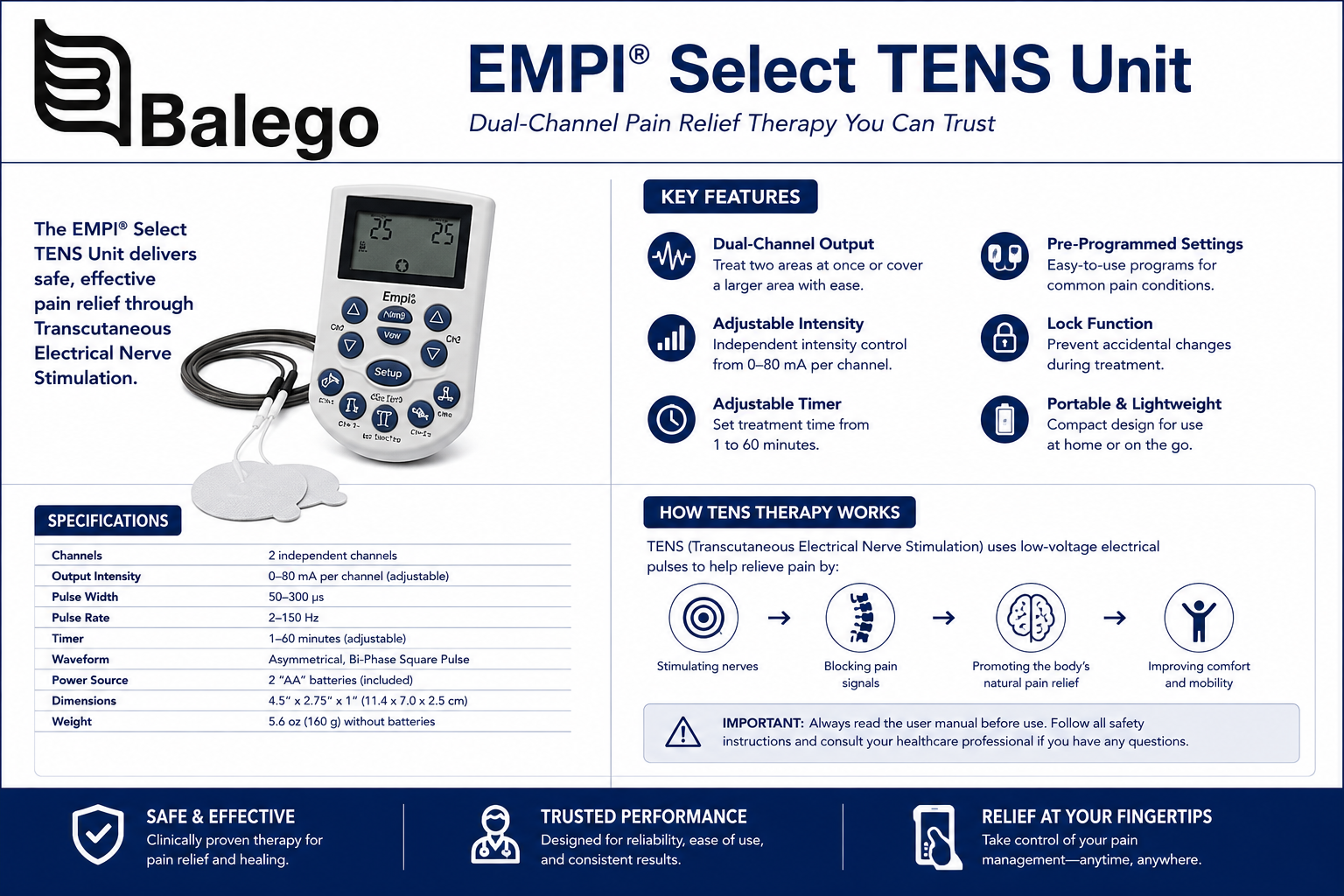
EMPI Select at a Glance
| Feature | EMPI Select information |
|---|---|
| Device type | Portable dual-channel TENS unit |
| Model / SKU | 199584-001 |
| Primary purpose | Clinician-directed symptomatic pain-management support |
| Output channels | Two independently adjustable channels |
| Total program options | Nine |
| Quick Select programs | Knee, shoulder, low back/hip, hand/wrist, and back |
| Additional modes | Continuous, Burst, Simple Modulated Pulse, and Modulation |
| Intensity display | 0.0–60.0 in 0.5 increments |
| Maximum published output | Up to 60 mA peak-to-peak into the specified test load |
| Pulse-rate range | 2–150 pulses per second |
| Pulse-duration range | 0–400 microseconds at 50% peak amplitude |
| Waveform | Balanced asymmetrical biphasic waveform |
| Session timer | 1–60 minutes or off |
| Treatment tracking | Sessions, total hours, average session length, and average intensity |
| Power | Two AA alkaline or compatible rechargeable NiMH batteries |
| Size | Approximately 4.31 × 2.38 × 1.38 inches |
| Weight | Approximately 4.9 ounces with batteries |
The manual lists a balanced asymmetrical biphasic waveform, adjustable pulse duration up to 400 microseconds, a 2–150 pps rate range, and output of 60 mA under the manual’s stated measurement conditions.
What TENS Does—and Does Not Do
TENS applies pulsed electrical current through surface electrodes placed on intact skin. The intended experience is generally a strong but comfortable sensory stimulation rather than a forceful muscle contraction.
The EMPI manual describes two traditional ways of explaining TENS:
- Gate-control explanation: Nonpainful sensory input may interfere with or modify pain-signal transmission.
- Endogenous pain-modulation explanation: Certain stimulation patterns may activate the body’s internal pain-inhibitory processes.
These are useful teaching models, but they should not be interpreted as a guarantee that every program will relieve every type of pain.
What the EMPI Select can support
The device labeling identifies TENS for:
- Symptomatic relief and management of chronic, intractable pain
- Adjunctive treatment of acute pain following surgery or trauma
- Relief of pain associated with arthritis
The manual also emphasizes that electrical stimulation is symptomatic care and has no curative value. It should not be used before the source of an undiagnosed pain syndrome has been evaluated.
What the EMPI Select does not do
| Misconception | More accurate explanation |
|---|---|
| “The body-area button diagnoses my problem.” | Quick Select buttons recall stimulation programs; they do not diagnose the cause of pain. |
| “The knee button tells me exactly where to place pads.” | Electrode placement remains clinician-directed. |
| “The number on the screen is comparable with every other TENS unit.” | Perceived strength depends on waveform, electrode size, skin contact, load, and device design. |
| “Higher intensity is always better.” | Intensity should be strong and comfortable, not painful or burning. |
| “TENS heals injured tissue.” | The manual describes it as symptomatic pain-management support, not a curative treatment. |
| “EMPI Select can strengthen muscles.” | It is a TENS unit, not an NMES device designed to produce therapeutic muscle contractions. |
| “A program that worked once should be used for every pain condition.” | Program choice, placement, and dose should follow the clinician’s current treatment plan. |
Understanding the Nine EMPI Select Programs
The EMPI Select contains five Quick Select body-area programs and four programs selected with the Mode button. The body-area names are interface shortcuts—not promises that a particular waveform is uniquely effective for that body part.
The manual assigns the following patterns.
Quick Select Program Comparison
| Quick Select button | Program pattern | Default behavior | What the sensation may feel like |
|---|---|---|---|
| Knee | Alternating Ramped Burst, or ARB | Channels alternate through gradual ramp-up, hold, and ramp-down periods | Rhythmic cycles that move between the two electrode channels |
| Shoulder | Simple Modulated Pulse, or SMP | The pulse pattern varies over a repeating cycle | Changing or rolling sensory stimulation |
| Low Back/Hip | Modulated Amplitude, or MA | Output alternates between the selected level and a lower percentage | A rhythmic increase-and-decrease sensation without a complete off period |
| Hand/Wrist | Simple Modulated Pulse, or SMP | Uses the same broad modulation family as the shoulder program | Changing sensory pattern rather than a completely steady signal |
| Back | Modulated Amplitude, or MA | Uses the same broad pattern as the low-back/hip preset | Repeated changes between stronger and softer stimulation |
Knee Quick Select: Alternating Ramped Burst
The knee preset uses an alternating ramped burst pattern. Channel 1 gradually rises to the selected intensity, remains at that level briefly, and then decreases. Channel 2 begins its cycle after Channel 1 completes its cycle.
This creates a distinctly alternating sensation when both channels are used. It should not be confused with alternating NMES, because the EMPI Select remains a pain-focused TENS device.
Shoulder and Hand/Wrist Quick Select: Simple Modulated Pulse
The shoulder and hand/wrist buttons recall the Simple Modulated Pulse program. The default program varies pulse characteristics over a repeating cycle rather than delivering one unchanging pulse pattern.
The changing sensation may help some users remain aware of stimulation during a session, but the program name does not determine electrode location.
Low Back/Hip and Back Quick Select: Modulated Amplitude
These presets use modulated amplitude. The manual’s default program alternates between the selected intensity and a lower percentage of that level every half-second, without a complete off period.
A user may therefore notice a steady rhythmic fluctuation and mistakenly believe that the device is losing contact. A true pad-contact problem is instead accompanied by the flashing electrode-contact icon and automatic reduction of channel intensity.
Additional Mode Comparison
| Mode-button program | Pattern | Default program characteristic | Best reason to select it |
|---|---|---|---|
| Continuous | Steady repeating pulses | Default rate of 125 pps, adjustable by a clinician | A consistent, predictable sensory pattern |
| Burst | Pulses delivered in repeating groups with off periods | Default rate of 15 pps with repeating ramp and rest cycle | A pronounced on-and-off rhythmic sensation |
| SMP | Simple Modulated Pulse | Repeating variation in pulse characteristics | When a changing sensory pattern is preferred |
| Modulation | Pseudorandom changes in rate and pulse duration | Cycles through multiple programmed rates | The most varied of the four general program modes |
The manual allows selected parameters to be adjusted across the programs. Adjustable ranges vary by program and can include pulse rate, pulse duration, cycle time, and modulation span. These settings should be changed only according to the clinician’s plan.
EMPI Select Default Program Details
| Program | Default rate | Additional default behavior |
|---|---|---|
| Knee ARB | 100 pps | 0.5-second ramp, 5-second hold, alternating channels |
| Shoulder SMP | 125 pps | 12-second cycle with 40% modulation span |
| Low Back/Hip MA | 125 pps | 1-second cycle with 60% span |
| Hand/Wrist SMP | 125 pps | 12-second cycle with 40% modulation span |
| Back MA | 125 pps | 1-second cycle with 60% span |
| Continuous | 125 pps | Continuous stimulation at the selected level |
| Burst | 15 pps | Repeating on-and-off burst cycle |
| General SMP | 125 pps | 12-second cycle with modulation |
| Modulation | Variable | Pseudorandom rates from 2 through 150 pps |
These are the factory defaults documented in the EMPI Select manual. They are not universal clinical prescriptions, and a clinician may have customized one or more Quick Select buttons.
How to Tell Whether a Quick Select Button Has Been Customized
Each body-area button can store modified parameters.
When a customized Quick Select program has been saved:
- The screen displays Custom
- Pressing the associated body-area button recalls the saved settings
- The program may no longer match the published factory defaults
- Resetting the device can clear both stored treatment data and customized settings
The manual states that a modified Quick Select program is saved by holding its body-area button for approximately five seconds after changing parameters. Clinicians should document custom settings rather than relying on the body-area icon alone.
Understanding the Two Independent Channels
The EMPI Select has two output channels, and each channel controls one complete electrode pair.
| Setup | Lead wires | Electrodes | Intensity controls |
|---|---|---|---|
| One-channel setup | 1 | 2 | Adjust one channel |
| Two-channel setup | 2 | 4 | Adjust Channel 1 and Channel 2 separately |
The two intensity values do not need to match. Differences in skin resistance, electrode position, pad size, tissue contour, and symptoms can make the same numerical setting feel different between channels.
Each channel requires two connected electrodes. The manual states that the device will not operate properly when an active channel has an incomplete electrode pair.
What the Intensity Number Means
The EMPI Select screen displays intensity from 0.0 to 60.0 in increments of 0.5.
That number is best understood as the device’s intensity setting, not as a treatment dose that can be directly compared with a different TENS model. Actual current delivered through the circuit is affected by the following:
- Electrode size
- Electrode condition
- Skin preparation
- Pad adhesion
- Body location
- Electrical resistance
- Pulse duration
- Selected waveform
- Device load behavior
Fresh, well-adhered electrodes may make a lower setting feel stronger than the same setting used with dry or partially detached pads.
The manual’s maximum-output specification is measured under controlled test conditions and should not be interpreted to mean that the screen number always equals the exact current passing through the patient.
Why the Intensity Returns to Zero
The EMPI Select resets both channel intensities to zero when:
- The unit is turned on
- A different program is selected
- Electrode contact remains poor for more than approximately 30 seconds
- Treatment ends or both channels remain at zero
- Certain settings are reset
Returning to zero when changing programs is an intentional safety feature. The same numerical intensity may feel substantially different when the pulse pattern changes.
Built-In Safety and Feedback Features
Automatic intensity lockout
When intensity is above zero and no button has been pressed for approximately 15 seconds, the controls lock. This helps prevent unintended changes from clothing or accidental button presses.
The unit is unlocked by pressing the intensity-decrease button for the channel being adjusted. Full instructions are provided in the EMPI Select Quick Start Guide.
Electrode-contact monitoring
A separate pad-contact icon is provided for each channel. When the unit detects poor contact:
- The appropriate icon flashes
- After about three seconds, intensity drops to 6.0
- If contact is restored within 30 seconds, output can ramp back toward the prior setting
- If poor contact lasts longer, intensity drops to zero
This feature can help identify a lifted electrode, incomplete lead-wire connection, dry pad, or broken circuit. It cannot determine the clinical correctness of electrode placement.
Independent channel lights
Each channel has an indicator light associated with output. This can help distinguish between an inactive channel and a channel that is running at a low perceived intensity.
Low-battery indicator
The screen displays battery condition. The manual states that the unit uses two AA batteries and can be operated with matching alkaline or compatible rechargeable NiMH batteries. Battery types should not be mixed.
Treatment Tracking and Compliance Data
One of the EMPI Select’s most distinctive features is its ability to store basic use information for clinician review.
| Data code | Information stored | Why it may be useful |
|---|---|---|
| SES | Number of qualifying treatment sessions | Helps review how often the device was used |
| HrS | Total accumulated treatment hours | Shows overall use time |
| ASL | Average session length | Helps compare actual sessions with the treatment plan |
| Channel 1 | Average Channel 1 intensity | Provides a general record of channel use |
| Channel 2 | Average Channel 2 intensity | Allows comparison between the channels |
The manual states that the session counter records a qualifying session when intensity reaches at least 3.0. It can store up to 255 sessions, along with accumulated treatment time and average channel intensity.
What compliance data can show
The records can help answer questions such as the following:
- Was the unit used consistently?
- Were sessions much shorter or longer than instructed?
- Was one channel commonly left at zero?
- Did the patient tolerate only very low settings?
- Did actual use differ from the prescribed schedule?
What compliance data cannot show
The stored values do not establish the following:
- Correct electrode placement
- Whether the appropriate program was selected
- Whether stimulation was comfortable
- Whether the pain diagnosis was correct
- Whether the device improved function
- Why the patient did or did not use the unit
The data are most useful as the beginning of a follow-up conversation rather than as a complete measure of adherence or outcome.
EMPI Select Safety Summary
The complete manual should remain the controlling safety reference. The following is a condensed selection guide rather than a replacement for the labeling.
Do not use the EMPI Select when:
- The patient has a demand-type cardiac pacemaker
- The patient has an implanted defibrillator
- Stimulation would be applied through the head
- Electrodes would be placed over the carotid sinus region of the throat
- The pain syndrome has not been diagnosed
- The proposed electrode path would pass through the chest
Additional warnings and precautions
- Safety during pregnancy has not been established.
- Do not place electrodes across the throat or mouth.
- Do not apply stimulation over infected skin, eruptions, or areas with decreased sensation.
- Use caution when heart disease is suspected.
- Do not use simultaneously with high-frequency surgical equipment.
- Do not immerse the device in liquid.
- Reduce intensity when stimulation becomes uncomfortable.
- Stop if persistent skin irritation, burns, or blistering develops.
- TENS should not mask pain that requires further medical assessment.
These contraindications and warnings are stated in the EMPI Select prescribing information.
Electrode Size and Current Density
The manual recommends an electrode surface area of at least approximately 7.9 square centimeters, or about 1.23 square inches, for the specified device output conditions. The original kit commonly included two-inch round or two-inch square reusable electrodes.
Electrode size affects how concentrated the stimulation feels.
| Electrode characteristic | Likely effect |
|---|---|
| Smaller surface area | More concentrated current density at a given setting |
| Larger surface area | Broader current distribution and often a smoother sensation |
| Dry or lifted pad | Uneven contact and potentially sharp stimulation |
| Fresh, fully adhered pad | More consistent current transfer |
| Pad over prominent bone | May feel sharper than placement over suitable soft tissue |
| Mismatched pad sizes on one channel | Uneven current density between the two electrodes |
For premium replacement pads, compare Starburst electrodes, which are available in round, square, rectangular, and larger round formats. We also offer a broader selection in the electrotherapy electrode collection.
EMPI Select Replacement Accessories
Replacement electrodes
The original EMPI Select lead wires use pin connections at the electrode end. Before ordering replacement pads, verify:
- The electrode accepts the lead-wire pin
- The pad has an appropriate surface area
- The shape suits the treatment location
- The pads are intended for stimulation rather than monitoring
- The replacement is consistent with the clinician’s placement plan
Starburst Electrodes are a premium pigtail-style option for compatible TENS lead wires. Balego TENS/NMES/FES electrodes offer a made-in-USA everyday replacement option in multiple sizes.
Replacement lead wires
The device-side connector is EMPI-specific. A replacement wire may have standard electrode pins but still fail to fit the Select output jack.
The EMPI 40-inch Safety Lead Wire, part number 193057-100, is listed for compatible EMPI applications. Confirm the device model before ordering because EMPI used more than one connector design across its product families.
Batteries
Use two matching AA batteries:
- Two alkaline AA batteries, or
- Two compatible rechargeable NiMH AA batteries
Do not mix chemistries, old and new batteries, or rechargeable and nonrechargeable cells. Never attempt to recharge alkaline batteries.
EMPI Select vs. Other Balego TENS Options
This comparison focuses on device philosophy and intended workflow, avoiding the longer product specifications already provided on each product page.
| Device | Modalities | Program approach | Treatment tracking | Power | Best fit |
|---|---|---|---|---|---|
| EMPI Select | TENS | Five Quick Select body-area programs plus four adjustable modes | Yes | Two AA batteries | Clinician-guided TENS programs needing customizable presets and use records |
| Balego TENS Digital Edition | TENS | Five conventional digital TENS modes with direct parameter control | Model-dependent usage display; not the same EMPI compliance workflow | 9V battery | High-value TENS when adjustable output and familiar modes are priorities |
| InTENSity 10 | TENS | Ten preset programs designed for simplified selection | Simpler workflow | Replaceable battery | Users prioritizing straightforward preset operation |
| Twin Stim IV | TENS and NMES | Body-area programs for both sensory and muscle stimulation | Yes | Rechargeable battery | Users who need pain-focused TENS and muscle-contraction NMES in one unit |
The EMPI Select is most distinctive when the user needs TENS-only treatment with independent channels, clinician-customizable Quick Select programs, and stored session data. The Balego TENS Digital Edition emphasizes value and conventional TENS controls; the InTENSity 10 emphasizes simplified presets; the Twin Stim IV adds NMES and rechargeable operation.
EMPI Select vs. Basic TENS Units
| Feature | EMPI Select | Typical basic TENS unit |
|---|---|---|
| Channels | Two | Usually two |
| Body-area shortcuts | Five | Often none |
| General modes | Four | Commonly three to five |
| Clinician customization | Quick Select programs can be modified and stored | Usually limited |
| Compliance data | Sessions, hours, average duration, and average intensity | Often absent |
| Pad-contact monitoring | Separate indicator for each channel | Product-dependent |
| Intensity lockout | Automatic | Product-dependent |
| Interface complexity | Moderate | Usually simpler |
| Best user | Someone trained to follow a structured clinician-directed program | Someone needing straightforward conventional TENS controls |
A basic unit may be the better choice when simplicity and low cost are the main priorities. The EMPI Select is better differentiated by structured programming, follow-up data, and the ability to customize body-area buttons.
When the EMPI Select Is the Better Choice
Consider the EMPI Select when:
- The treatment plan requires TENS rather than NMES
- Separate control of two electrode pairs is needed
- The clinician wants repeatable body-area presets
- A Quick Select program may need custom parameters
- Treatment-use information will be reviewed at follow-up
- Replaceable AA batteries are preferred
- The patient has been trained to use a moderately detailed interface
- EMPI-specific accessories are already in use
When Another Device May Be More Appropriate
Consider another Balego unit when:
- The user wants the simplest possible preset interface
- A rechargeable battery is a priority
- NMES muscle stimulation is required
- Interferential or Russian stimulation is needed
- Four treatment channels are required
- Replacement EMPI-specific lead wires are difficult to maintain
- Compliance tracking is not needed
- Cost is more important than customizable clinician presets
Browse the full Balego TENS collection to compare TENS-only, rechargeable, preset-driven, and combination electrotherapy systems.
Frequently Asked Questions
Is EMPI Select a TENS or NMES unit?
It is a TENS-only pain-control device. It does not contain NMES programs intended to produce therapeutic muscle contraction.
How many programs does the EMPI Select have?
It has nine program options: five Quick Select body-area programs and four additional modes selected with the Mode button.
What are the five Quick Select programs?
The buttons are labeled knee, shoulder, low back/hip, hand/wrist, and back. Each recalls a factory-programmed stimulation pattern unless a clinician has saved custom parameters.
Do the body-area buttons determine electrode placement?
No. They select stimulation programs. Electrode placement must follow the prescribing clinician’s instructions.
Which program does the knee button use?
The factory knee preset uses alternating ramped bursts. The two channels cycle alternately when both are active.
Which program does the shoulder button use?
The shoulder preset uses Simple Modulated Pulse.
Which program does the low-back/hip button use?
It uses modulated amplitude.
What is the difference between continuous and burst?
Continuous delivery delivers a steady, repeating pulse pattern. Burst delivers pulses in groups separated by programmed lower-output or off periods.
What does SMP mean?
SMP means Simple Modulated Pulse. It varies the characteristics of the stimulation over a repeating cycle rather than remaining completely uniform.
Why does the program sometimes feel as though it is fading?
SMP, Modulated Amplitude, Burst, and Modulation intentionally vary the sensation. Check the displayed program and pad-contact icon before assuming the unit is malfunctioning.
What does “Custom” mean on the screen?
It indicates that the factory parameters for a Quick Select button have been changed and saved.
Does the EMPI Select remember the last program?
Yes. It starts on the last program used, but both channel intensities return to zero when the unit is turned on.
Why does EMPI Select lock?
The controls automatically lock after approximately 15 seconds of inactivity while intensity is above zero. This helps prevent accidental changes.
How is the unit unlocked?
Press the intensity-decrease button for the channel that needs adjustment. Detailed steps appear in the EMPI Select Quick Start Guide.
What does the flashing pad icon mean?
The device has detected poor electrode contact or an incomplete channel circuit. Inspect the pads, lead wires, and connections.
What data does the EMPI Select record?
It stores qualifying treatment sessions, total accumulated hours, average session length, and average intensity for each channel.
Does it record exact electrode placement?
No. It cannot determine where the electrodes were placed or whether the placement was clinically correct.
How many batteries does the EMPI Select use?
Model 199584-001 uses two AA batteries. The existing three-AAA statement on Balego’s product page should be corrected.
Can rechargeable batteries be used?
The manual permits two compatible NiMH rechargeable AA batteries. Do not mix battery types and never recharge alkaline batteries.
What is the maximum output?
The manual lists output through 60 mA peak-to-peak into the specified test load. Actual delivered current and sensation depend on the electrical load, electrodes, skin contact, and programmed pulse characteristics.
Are EMPI Select intensity numbers directly comparable with another TENS unit?
No. Device scales, waveforms, pulse widths, loads, and electrodes differ. A setting of 20 on one model should not be assumed equivalent to 20 on another.
What replacement pads work with EMPI Select?
Use stimulating electrodes compatible with the original lead-wire pins and the minimum pad-size requirements. Compare Starburst Electrodes and Balego TENS Electrodes.
Can a generic lead wire be used?
Not necessarily. The device-side connector must fit the EMPI Select output jack. Confirm compatibility before ordering.
How long should a treatment last?
The manual notes that many prescribed sessions historically ranged from 30 to 120 minutes, but the correct duration and spacing are determined by the prescribing clinician. The unit’s built-in timer is limited to 1–60 minutes, or it may be turned off.
Can EMPI Select cure the cause of pain?
No. Its manual describes TENS as symptomatic treatment without curative value. Pain that is new, worsening, or undiagnosed requires appropriate evaluation.
Clinical and Buyer Takeaway
The EMPI Select is not differentiated simply by having nine programs. Its real strengths are the combination of the following:
- Five recognizable Quick Select buttons
- Four additional TENS modes
- Independent dual-channel intensity
- Customizable program parameters
- Automatic intensity lockout
- Electrode-contact monitoring
- Stored treatment-use data
It is best suited to a clinician-guided TENS program in which repeatable setup and follow-up information matter. Buyers who need simpler presets may prefer the InTENSity 10, while those needing both TENS and muscle-stimulation programs should compare the Twin Stim IV.
For operational instructions, including setup, unlocking, timer use, pad-contact warnings, batteries, and troubleshooting, continue to the EMPI Select Quick Start Guide.
Shop the EMPI Select TENS unit, compare replacement electrodes, or browse our complete TENS device collection.


