



The IF-4000 Interferential IFC Machine is a portable, dual-channel interferential stimulator that can operate with either one pair or two pairs of electrodes. It uses a fixed 4,000 Hz carrier frequency and provides an adjustable 1–150 Hz difference frequency.
This guide focuses specifically on operating the IF-4000: selecting the correct electrode mode, connecting the lead wires, understanding the controls, starting a treatment safely, and resolving common setup problems.
For a broader explanation of interferential current, beat frequency, and adjustable interference frequency, read Interferential Current Therapy versus Adjustable Interference Frequency.
Important: Treatment frequency, electrode placement, intensity and session duration should come from the prescribing professional. The device is intended for symptomatic pain management and does not diagnose or cure the underlying cause of pain.
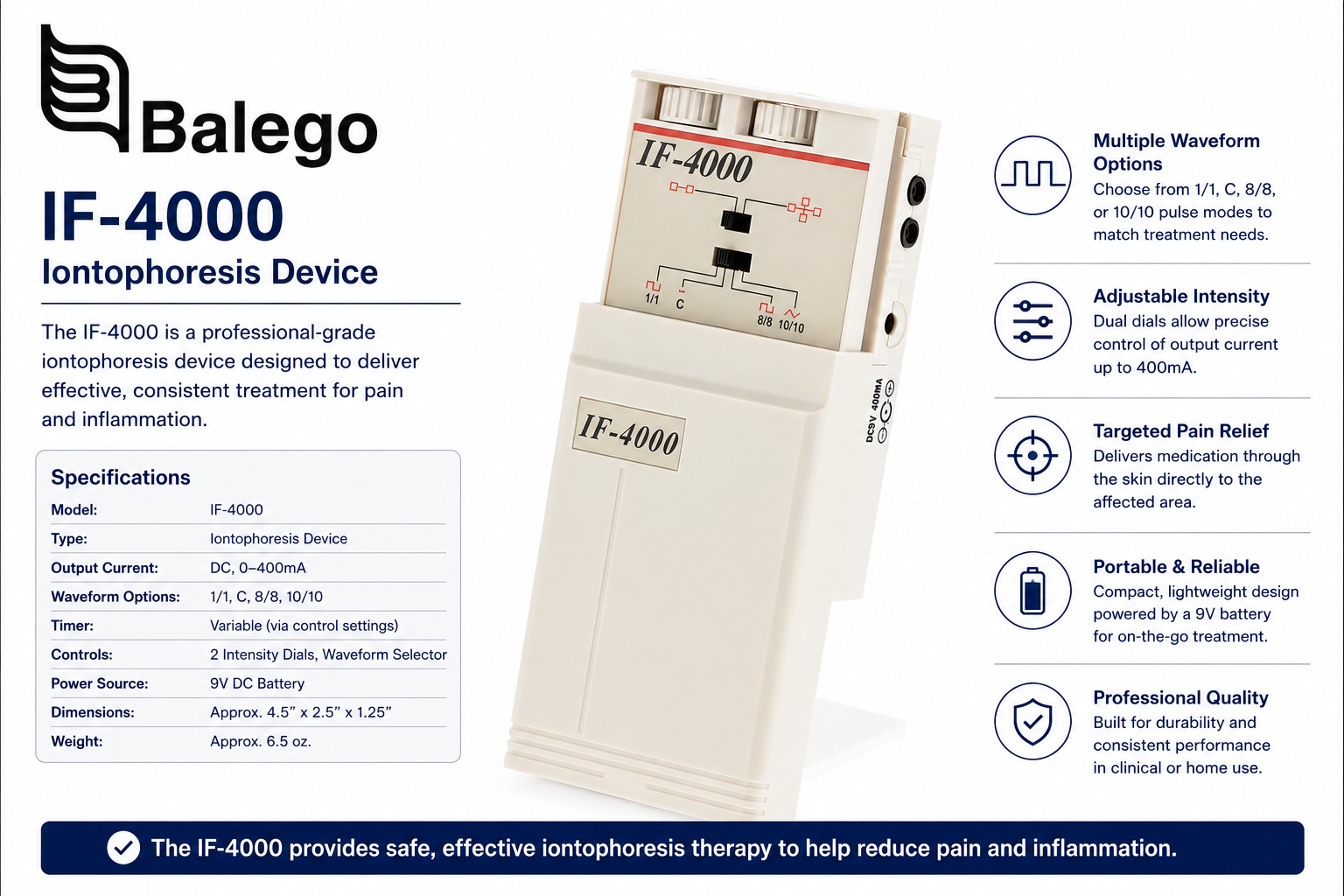
IF-4000 quick-reference table
| Question | IF-4000 answer |
|---|---|
| What type of device is it? | Dedicated interferential current stimulator |
| How many channels does it have? | Two |
| Can it operate with two electrodes? | Yes—use Channel 2 only |
| Can it operate with four electrodes? | Yes—use Channels 1 and 2 |
| Which control turns the unit on? | The Amplitude dial |
| Which control changes treatment intensity? | The Amplitude dial |
| What does the rate dial control? | The clinician-selected difference frequency |
| What frequency range is available? | 1–150 Hz difference frequency |
| What are the four shift modes? | Continuous, 1/1 abrupt, 8/8 abrupt and 10/10 ramped |
| What powers the device? | One 9V alkaline battery or the specified AC adapter |
| Does Channel 1 work in two-electrode mode? | No—this is normal |
| Is a treatment timer shown in the manual? | No—follow the prescribed duration with an external timer |
Before beginning: record the prescribed settings
The IF-4000 has manually adjustable controls rather than body-part presets. Before the first session, the user should be able to answer each of the following questions from the prescribing clinician.
| Treatment detail | Information to obtain |
|---|---|
| Treatment location | Exact anatomical area |
| Electrode configuration | Two or four electrodes |
| Electrode placement | Exact position and spacing |
| Rate or frequency | Prescribed dial setting |
| Frequency-shift mode | C, 1/1, 8/8, or 10/10 |
| Intensity | Sensory level or clinician-defined response |
| Session duration | Number of minutes |
| Treatment schedule | Sessions per day or week |
| Stop instructions | Symptoms or reactions requiring discontinuation |
Understanding the IF-4000 controls
The IF-4000 uses two switches on the top of the device, two adjustment dials on the front, and three connection receptacles on the side.
| Control or connection | Function | Common setup mistake |
|---|---|---|
| Electrodes switch | Selects two-electrode or four-electrode operation | Leaving the switch in four-electrode mode while using one pair |
| Mode selector | Selects Continuous, 1/1, 8/8, or 10/10 frequency shifting | Confusing the mode selector with intensity |
| Rate/Frequency dial | Sets the prescribed difference frequency | Changing the rate when trying to increase strength |
| Amplitude dial | Turns the device on and controls stimulation strength through both channels | Connecting or removing pads while the dial is on |
| Power indicator | Shows that the device is operating | Assuming the indicator confirms good electrode contact |
| Low-battery indicator | Glows amber when the battery requires replacement | Mistaking a brief startup flash for a depleted battery |
| Channel 1 output | Used as part of a four-electrode setup | Expecting output from it in two-electrode mode |
| Channel 2 output | Used in both two- and four-electrode configurations | Plugging a single pair into Channel 1 |
| Adapter receptacle | Accepts the specified 9V DC adapter | Using an unverified replacement adapter |
One amplitude control operates both channels
The IF-4000 does not provide separate intensity dials for Channels 1 and 2. The single amplitude control changes the stimulation strength delivered through both channels.
Therefore, when one electrode path feels noticeably stronger than the other during a four-electrode setup, first check:
- Electrode adhesion and edge contact
- Pad age and gel condition
- Lead-wire connections
- Skin oils, lotion, perspiration or hair
- Electrode spacing and placement
- Whether one pad is partially detached
Do not attempt to correct unequal sensation by moving electrodes while the device is operating.
How to set up the IF-4000
1. Confirm the treatment instructions
Verify the prescribed electrode configuration, placement, frequency, shift mode, intensity goal, and treatment duration before connecting the device.
2. Turn the Amplitude dial fully to OFF
The amplitude dial is both the power switch and the intensity control. It should be in the OFF position whenever electrodes or lead wires are being attached, disconnected, or adjusted.
3. Check the power source
Install a fresh 9V alkaline battery or connect the specified AC adapter. When the adapter is connected, the IF-4000 automatically disconnects battery power.
4. Inspect the electrodes and lead wires
Do not use electrodes that are dry, contaminated, torn, or lifting around the edges. Inspect the lead-wire insulation, connector pins, and device plugs for damage.
5. Clean and dry the skin
Wash the treatment area with mild soap and water and dry it completely. Remove lotions, oils, and perspiration. Clip excessive hair when necessary rather than shaving immediately before treatment.
6. Connect the lead wires to the electrodes
Insert each pin fully into the electrode connector. No metal portion of the pin should remain exposed.
7. Apply the electrodes
Place the pads only in the locations identified by the clinician. Press across the entire electrode surface, especially around the edges, to create uniform contact.
8. Connect the correct output channel
- Two electrodes: Connect the lead wire to Channel 2 and select the two-electrode switch position.
- Four electrodes: Connect one lead-wire pair to Channel 1 and the other pair to Channel 2, then select the four-electrode position.
9. Select the prescribed frequency and shift mode
Set the rate dial and mode selector before raising the intensity.
10. Increase the Amplitude slowly
Turn the amplitude dial clockwise until the prescribed stimulation level is reached. The sensation should follow the clinician’s directions and should not feel sharp, burning, or unexpectedly painful.
11. Track the prescribed treatment time
The control layout in the official manual does not identify a built-in treatment timer. Use an external timer and do not extend the session beyond the prescribed duration.
12. End the session safely
Turn the amplitude control fully to OFF before disconnecting lead wires or removing electrodes. Peel reusable pads gently from the edge rather than pulling on the wire or connector.
Two-electrode versus four-electrode operation
The electrode-count switch must match the number of pads connected to the unit.
| Configuration | Switch position | Output connection | What to expect |
|---|---|---|---|
| Two electrodes | Two-electrode position | Channel 2 only | Channel 1 remains inactive |
| Four electrodes | Four-electrode position | Channels 1 and 2 | Both current paths operate |
| One pair connected to Channel 1 | Incorrect for two-electrode use | Channel 1 only | No stimulation in two-electrode mode |
| Four pads with switch set to two | Incorrect | Both channels connected | Channel 1 will not provide the intended output |
The two-electrode arrangement is sometimes described as bipolar or two-pole operation. Four-electrode operation may be called quadripolar or four-pole IFC. Electrode placement should still be prescribed rather than selected from a generic diagram.
What do C, 1/1, 8/8, and 10/10 mean?
The rate dial establishes the selected difference frequency. The mode selector determines whether that frequency remains steady or changes over time.
| Mode | Frequency behavior | Practical description |
|---|---|---|
| C / Continuous | No programmed frequency shifting | Steady pattern |
| 1/1 abrupt | Changes abruptly between lower and higher values approximately every second | Rapid alternating pattern |
| 8/8 abrupt | Holds each value for approximately eight seconds before changing | Slower alternating pattern |
| 10/10 ramped | Gradually moves from the lower value to the higher value and back | Smooth sweeping pattern |
The manual uses a 100 Hz dial setting as an example. In a shifting mode, the frequency changes from approximately 75 Hz to 155 Hz, representing a shift from 25% below to 55% above the selected value. That example explains how the control behaves; it is not a universal treatment recommendation.
Rate is not the same as intensity
This is one of the most important distinctions when operating the IF-4000:
- The rate dial changes frequency.
- The amplitude dial changes stimulation strength.
- The mode selector changes how the frequency varies during the session.
Turning the rate dial alters stimulation in ways other than simply making it “stronger,” and raising amplitude does not change the prescribed frequency.
IF-4000 troubleshooting guide
| Problem | Likely explanation | What to check |
|---|---|---|
| The device will not turn on | The amplitude dial is still OFF, battery is depleted or adapter is not connected | Return dial to OFF, inspect power source and restart |
| No stimulation with two electrodes | The lead wire is connected to Channel 1 | Move the lead to Channel 2 |
| Channel 1 does not work in two-electrode mode | Normal device operation | Channel 1 is intentionally inactive in this mode |
| The power light is on but no stimulation is felt | Loose lead, poor pad contact, incorrect switch position or intensity at minimum | Turn off, reconnect everything and restart at low amplitude |
| Stimulation feels weak | Low battery, worn pads, incomplete contact or loose connector | Replace battery or electrodes and inspect connections |
| Stimulation feels sharp or stinging | The pad edge is lifting, gel is dry, skin is not clean or intensity is excessive | Turn off immediately and correct contact before restarting |
| One side feels stronger | Unequal electrode contact or skin resistance | Inspect all four pads and lead connections |
| The low-battery light stays amber | The battery requires replacement | Install a fresh 9V alkaline battery |
| The low-battery light flashes briefly at startup or shutdown | Normal indicator behavior | No action unless the light remains on during use |
| The unit works with the adapter but not with the battery. | The battery is depleted, installed incorrectly or disconnected | Inspect polarity and battery connector |
| The battery does not operate while adapter is connected | Normal operation | The adapter automatically disconnects the battery circuit |
| Output changes suddenly | Lead movement, pad lifting or intermittent connection | Turn off before touching wires or pads |
| Skin remains red or irritated | Sensitivity, excessive current density, worn electrodes or repeated placement | Stop treatment and contact the clinician |
A one-to-three-second low-battery-light flash when switching the device on or off can be normal. A sustained amber light during operation indicates that the battery should be replaced.
Replacing the IF-4000 battery
The IF-4000 uses one 9V alkaline battery.
- Turn the amplitude dial fully to OFF.
- Slide the front panel completely off.
- Tip the unit so the battery pivots outward.
- Unsnap the old battery from the connector.
- Attach a fresh 9V alkaline battery with the correct polarity.
- Return the battery to the compartment.
- Slide the front panel back into its grooves until it is fully seated.
Do not replace the battery while the unit is connected to a patient.
Choosing replacement electrodes
The manual directs clinicians to use appropriately cleared electrodes with an active area greater than 16 cm². Connector style, electrode size, and device compatibility should be confirmed before ordering.
Useful resources include:
- Electrotherapy Electrodes, TENS Pads, and NMES Pads
- Balego Reusable Hydrogel Electrodes
- DURA-STICK PLUS Electrodes
- 45-Inch Replacement Lead Wires
The commonly used two-inch-square electrode provides more than the manual’s stated 16 cm² minimum surface area. Nevertheless, electrode size should be selected for the anatomy, placement plan, comfort, and prescribed current density—not simply because a connector fits.
Replace reusable electrodes when they:
- No longer adhere across the entire surface
- Have dried, damaged or contaminated gel
- Curl or lift at the edges
- Produce sharp or inconsistent stimulation
- Disconnect intermittently from the lead wire
Return reusable pads to their release liner after use and keep them sealed in their storage package.
Contraindications, warnings and precautions
The following summary is based on the IF-4000 operating manual. It does not replace the full instructions or patient-specific medical screening.
| Safety issue | IF-4000 guidance |
|---|---|
| Cardiac pacemaker | Do not use |
| Known myocardial arrhythmia | Do not use without physician evaluation |
| Carotid sinus area | Do not apply stimulation |
| Laryngeal or pharyngeal muscles | Do not apply stimulation over the throat |
| Transcerebral application | Do not apply through or across the head |
| Undiagnosed pain | Do not treat until the cause has been evaluated |
| Pregnancy or delivery | Safety has not been established |
| Eye area | Do not stimulate near the eyes |
| ECG monitoring | IFC may interfere with monitoring equipment and alarms |
| Central-origin pain | The manual states that IFC is ineffective for central-origin pain |
| Dangerous machinery or driving | Avoid use where an unexpected control or sensation change could create danger |
| Skin condition | Apply only to clean, dry, intact skin |
| Persistent irritation | Stop treatment and consult the clinician |
| Allergic reaction, burn or blistering | Discontinue immediately and seek professional guidance |
| Children | Store the device, battery and accessories securely out of reach |
Patients with implanted electronic devices apart from a pacemaker should obtain specific medical clearance rather than assuming that the absence of that device from an older manual means treatment is safe.
What the evidence supports—and what it does not
Interferential current should be presented conservatively as a symptom-management modality. Research reviews suggest that IFC can reduce pain compared with placebo in some circumstances, but it has not consistently demonstrated superiority to TENS or an additional benefit when layered onto every standard rehabilitation program. It should therefore be used as one component of a broader plan that may include diagnosis, education, therapeutic exercise, mobility work, and other clinician-selected interventions.
IF-4000 versus other IFC-capable devices
The IF-4000 is best understood as a focused, analog IFC device. A different product may be more appropriate when a practice needs additional modalities, rechargeable power, independent channel controls, or built-in timers.
| Device | Modalities | Channels | Power and format | Best fit |
|---|---|---|---|---|
| IF-4000 Interferential IFC Machine | IFC | 2 | 9V battery or AC; analog | Dedicated, straightforward IFC operation |
| InTENSity IF Combo | TENS and IFC | 2 | 9V battery or AC; portable | Users needing both pain-focused modalities |
| InTENSity Select Combo II | TENS, NMES, IFC, and Russian | 2 | Rechargeable, portable digital interface | Multiple modalities in a compact unit |
| Twin Stim Plus DS5402 | TENS, EMS/NMES, IFC, and Russian | 4 | AA batteries or AC; two timers | Broader coverage, more electrode pairs and treatment tracking |
| Richmar Quattro 2.5 | TENS, EMS, Russian, IF-2P, and IF-4P | 4 | AC-powered clinical system | Clinics needing presets, custom programs and two treatment groups |
The IF-4000 remains the simplest choice when the treatment plan specifically calls for interferential stimulation and additional TENS, NMES, or Russian programs are unnecessary. The multi-modality alternatives add capabilities but also introduce more menus, settings, and training requirements.
Frequently asked questions
Is the IF-4000 a TENS unit?
No. It is a dedicated interferential current stimulator. TENS and IFC are both forms of transcutaneous electrical stimulation, but they use different waveform and frequency approaches. Browse our Interferential Therapy collection to compare IFC-capable devices.
Why am I getting no output from Channel 1?
When the switch is set to two-electrode operation, Channel 1 is intentionally inactive. Connect the single electrode pair to Channel 2.
Can I set different intensities for Channels 1 and 2?
No. The IF-4000’s single amplitude control adjusts the output strength through both channels. If the sensation is unequal, inspect electrode contact, skin preparation, and lead-wire connections.
Does the IF-4000 have a built-in treatment timer?
The official manual’s control diagram does not identify a treatment timer. Use an external timer and follow the duration prescribed by the clinician.
What does the rate dial change?
It changes the difference or beat frequency. It does not control stimulation intensity.
What does the 10/10 setting do?
It gradually sweeps the frequency from the lower shifted value to the higher shifted value over approximately ten seconds, then returns gradually over the next ten seconds.
Is a flashing low-battery light always a problem?
No. A brief flash lasting approximately one to three seconds during startup or shutdown is described as normal. A sustained amber light during operation indicates that the battery should be replaced.
Can I use a rechargeable 9V battery?
The operating manual specifies a 9V alkaline battery or the approved adapter. Do not substitute a different battery chemistry, voltage, or adapter unless compatibility has been confirmed by the device supplier or manufacturer.
Why does stimulation feel sharp instead of comfortable?
Common causes include a lifting electrode edge, dried gel, a loose connector, poor skin preparation, an electrode that is too small for the selected intensity, or excessive amplitude. Turn the unit off before inspecting the setup.
Can the IF-4000 be used at home?
It may be used in a professionally directed home program when it has been prescribed and the patient has received instructions for placement, settings, duration, maintenance, and safety.
IF-4000 supplies and support
Review the IF-4000 product page, compare additional interferential therapy machines, or browse replacement electrotherapy electrodes.
For assistance identifying compatible electrodes, lead wires, or an IFC-capable alternative, contact Balego.


