



The InTENSity Twin Stim IV, model DI2717, is a portable dual-channel electrical stimulation device that combines TENS and NMES programming. This operating guide explains how to connect the electrodes, choose a program, increase intensity, unlock the controls, pause treatment, charge the battery, review treatment records, and resolve common output problems.
This article is an operating companion rather than a replacement for the manufacturer instructions or a clinician’s treatment plan. For a broader explanation of when sensory-level TENS differs from contraction-based NMES, read TENS vs. NMES: Differences, Uses, and Device Selection.
Prescription-device notice: The manufacturer identifies the Twin Stim IV as a prescription device to be used under the continuing supervision of a licensed physician or practitioner. Electrode placement, treatment mode, program, intensity, duration, and frequency should be established before home use.
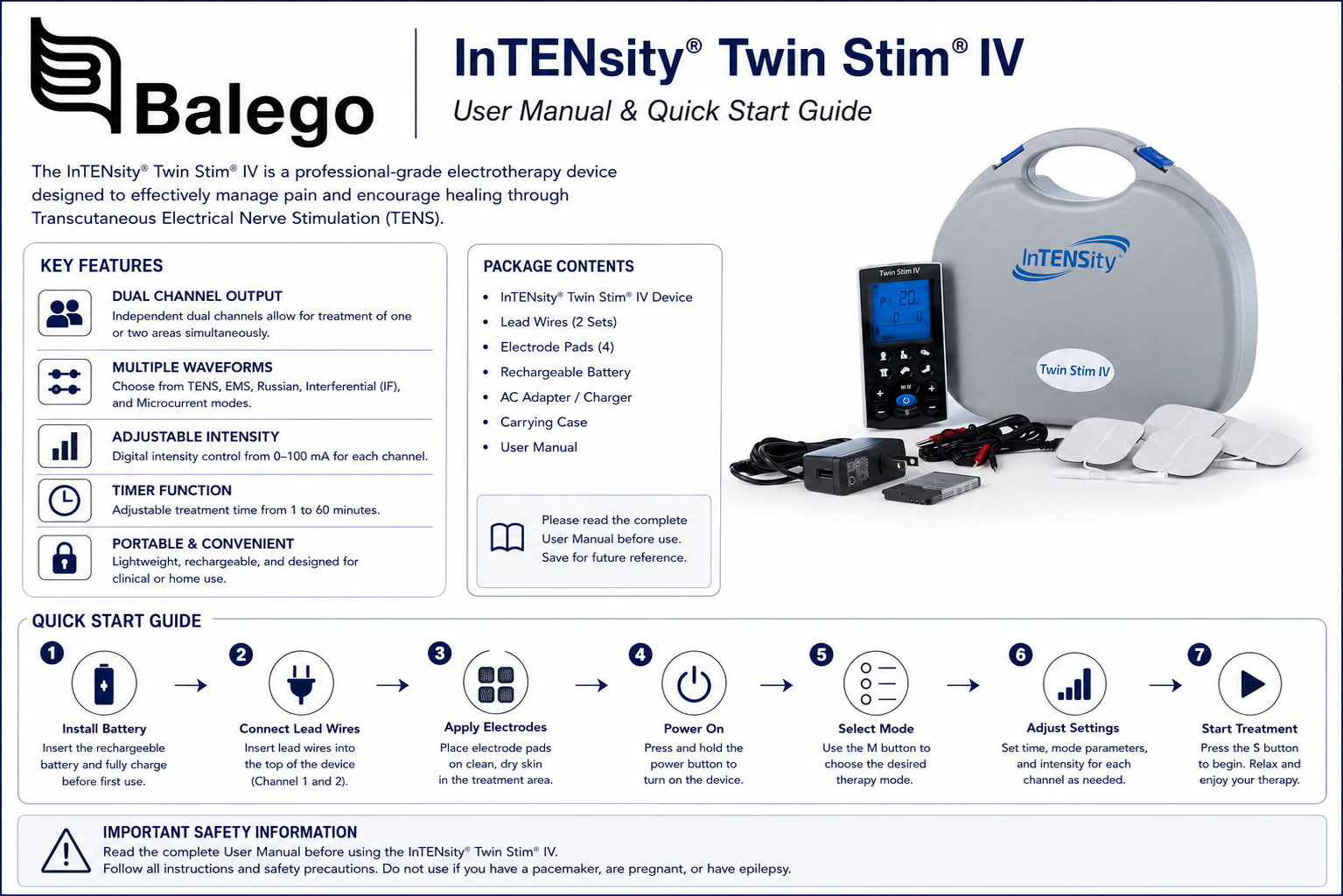
Quick answer: how do you unlock the Twin Stim IV?
The Twin Stim IV automatically locks its controls after approximately 20 seconds without a button press during active treatment. This does not ordinarily mean that the device has powered off or that treatment has stopped.
To unlock it:
- Look for the lock or key symbol on the LCD.
- Press CH1− or CH2− once.
- Confirm that the lock icon disappears.
- Make any needed intensity adjustment.
The minus button unlocks the controls without accidentally increasing output. The manufacturer specifically identifies CH1− or CH2− as the unlock buttons.
Twin Stim IV controls at a glance
| Control | What it does | Important operating note |
|---|---|---|
| Power | Turns the unit on, confirms some settings, stops treatment, and powers the unit off when held | Turn the device off before connecting or moving electrodes |
| M/II | Selects TENS or NMES when setting up; pauses or resumes active treatment | Holding it in standby opens compliance records |
| S / Set | Moves through adjustable program parameters | The flashing unit—Hz, µs, minutes, or seconds—shows what is being edited |
| Body-part buttons | Select neck, shoulder, hand, low back, knee, or foot program groups | A body-part label does not determine safe electrode placement |
| CH1+ / CH1− | Raises or lowers Channel 1 intensity | CH1 also unlocks the safety lock |
| CH2+ / CH2− | Raises or lowers Channel 2 intensity | CH2 also unlocks the safety lock |
| Output sockets | Connect one or two lead-wire sets | Use only the number of channels required by the treatment plan |
| USB charging port | Connects the approved charging equipment | Treatment cannot be performed while the charger is connected |
| Charging LED | Red while charging and green when charging is complete | Disconnect the charger before attempting treatment |
| LCD load indicator | Helps identify an interrupted electrode circuit | Poor pad contact can cause output to return to zero |
The LCD also displays the selected modality, body region, program, treatment time, channel intensity, adjustable parameters, pause status, lock status, battery condition, and compliance-record mode.
Before using the Twin Stim IV
Confirm the following information before the first session:
| Treatment question | Information that should be established |
|---|---|
| Which modality? | TENS or NMES |
| Which program? | P1, P2, or clinician-programmed U1 |
| Which body-area button? | Neck, shoulder, hand, low back, knee, or foot |
| Where do the electrodes go? | Exact placement for each electrode pair |
| How many channels? | One channel or both channels |
| What intensity is appropriate? | Sensory level for TENS or prescribed contraction level for NMES |
| How long is each session? | Prescribed treatment time |
| How often is it used? | Sessions per day or week |
| When should treatment stop? | Symptoms or skin reactions requiring discontinuation |
The body-part buttons select stored program groups; they do not diagnose the condition or automatically establish correct electrode placement. The “neck” button, for example, does not authorize placing electrodes over the throat, front of the neck, head, or face. The manufacturer prohibits those placements.
How to set up the Twin Stim IV
1. Begin with the device turned off
Do not connect, disconnect, reposition, or remove electrodes while current is being delivered.
2. Connect each lead wire to its electrode pair
Insert the two lead-wire pins fully into the electrode pigtails. No bare metal should remain exposed.
Each output channel requires a complete circuit formed by two electrodes. Connecting only one pad to a lead wire will not provide a usable treatment circuit.
3. Connect the lead wires to the device
Insert the insulated plug into Channel 1, Channel 2, or both sockets at the top of the device.
- Use one channel for one electrode pair.
- Use both channels for two electrode pairs.
- When only one channel is needed, connect only that lead-wire set.
The two channels have independent intensity controls but operate within the same selected TENS or NMES program.
4. Prepare the skin
Apply electrodes only to clean, dry, intact skin. Remove lotion, oils, perspiration, and debris that may interfere with adhesion.
Do not place electrodes over broken, inflamed, infected, swollen, or numb skin. Do not allow two electrodes to touch.
5. Apply the complete electrode surface
Press across the center and edges of each pad. A partially lifted edge can concentrate current and cause a sharper sensation.
6. Turn the device on
Press the Power button once. Do not raise intensity until the program and electrode setup have been checked.
7. Choose TENS or NMES
Press M/II while in setup mode to select the modality.
- Choose TENS when the prescribed goal is sensory-level stimulation.
- Choose NMES when the prescribed goal requires a visible or palpable muscle contraction.
For a detailed clinical comparison, see our TENS vs. NMES guide.
8. Select the body-area program group
Press the appropriate body-part button. Continue pressing the same button to cycle among P1, P2, and U1.
9. Increase intensity gradually
Press CH1+ or CH2+ to begin output on the connected channel. Increase one step at a time.
- TENS is generally adjusted to a strong but comfortable sensory sensation according to the treatment plan.
- NMES intensity is usually increased until the prescribed muscle response occurs without unacceptable discomfort.
Channel 1 and Channel 2 can be adjusted separately to account for differences in electrode contact, anatomy, and sensation.
What do P1, P2, and U1 mean?
| Program | Type | What can be adjusted by the user? |
|---|---|---|
| P1 | Manufacturer preset | Treatment time |
| P2 | Manufacturer preset | Treatment time |
| U1 in TENS | Manual TENS program | Pulse rate, pulse width, and treatment time |
| U1 in NMES | Manual NMES program | Treatment time, pulse rate, pulse width, ramp, contraction time, and relaxation time |
P1 and P2 provide different manufacturer-programmed patterns for each body-area button. U1 permits trained users to enter clinician-selected parameters.
The complete specifications and available adjustment ranges already appear on the Twin Stim IV product page.
How to program TENS U1
Use U1 only when the treatment settings have been supplied by a qualified clinician.
- Press M/II until TENS is displayed.
- Press the prescribed body-part button repeatedly until U1 appears.
- Press S. The Hz indicator flashes.
- Use + or − to select the prescribed pulse rate.
- Press S again. The µs indicator flashes.
- Use + or − to select the prescribed pulse width.
- Press S again. The minute indicator flashes.
- Use + or − to select treatment time.
- Confirm the settings and return to the home screen.
- Increase CH1 or CH2 intensity gradually.
Pulse rate describes how many pulses are delivered each second. Pulse width describes the duration of each pulse. Neither value is the same as intensity.
How to program NMES U1
NMES U1 includes additional timing controls because the unit cycles between muscle contraction and rest.
- Select NMES.
- Select the prescribed body part and continue pressing until U1 appears.
- Press S to enter treatment time.
- Press S again to enter pulse rate.
- Press S again to enter pulse width.
- Continue pressing S to enter ramp time.
- Set contraction time.
- Set relaxation time.
- Confirm the program and return to the main screen.
- Increase the connected channel intensity gradually.
| NMES parameter | Plain-language meaning |
|---|---|
| Pulse rate | How frequently stimulation pulses are delivered |
| Pulse width | How long each individual pulse lasts |
| Ramp | How gradually the contraction rises and falls |
| Contraction time | How long the active muscle-stimulation phase lasts |
| Relaxation time | How long the muscle rests between contractions |
| Treatment time | Total programmed session length |
Do not shorten the relaxation phase merely to create more contractions. Inadequate rest can contribute to muscle fatigue and an ineffective contraction pattern. The prescribing clinician should determine the work-to-rest relationship.
How to pause, resume, stop, and turn off treatment
| Desired action | Button sequence |
|---|---|
| Pause | Press M/II during treatment |
| Resume | Press M/II again |
| Stop and return to the home screen | Press Power |
| Turn the device completely off | Press and hold power. |
| Unlock controls | Press CH1− or CH2− |
The pause symbol appears on the display while treatment is suspended. Intensity should be returned to zero before electrodes are repositioned or disconnected.
Locking, standby shutoff, and output shutoff are different
Several normal safety behaviors can look like the device has stopped working.
| What happens | When it occurs | What the user sees | What to do |
|---|---|---|---|
| Safety lock | After about 20 seconds without a button press during treatment | Lock icon; treatment normally continues | Press CH1− or CH2− |
| Standby auto-off | After approximately three minutes without activity while not treating | The screen turns off and unit beeps | Press Power to restart |
| Open-circuit shutoff | Pad or lead connection opens while output is at least 10 mA | Affected intensity returns to zero | Turn down output and inspect the complete circuit |
| Charger safety shutoff | The charger is connected while the device is being used | The device turns off and will not restart | Disconnect charger before treatment |
| Low-battery warning | Battery charge is inadequate | The battery icon appears | Stop treatment and recharge |
These behaviors are not interchangeable. The safety lock protects settings; the standby function conserves battery power; open-circuit detection responds to poor electrode contact; and charger shutdown prevents treatment while charging.
Why does my Twin Stim IV appear to stop after 20 seconds?
The most likely explanation is the automatic safety lock.
Treatment continues, but the intensity buttons stop responding to ordinary increases after approximately 20 seconds without input. Check for the lock icon and press CH1− or CH2−.
It is not the 20-second lock when:
- The entire screen is blank.
- The device has been inactive in standby for about three minutes.
- The charger was connected during treatment.
- The low-battery symbol appeared.
- Channel intensity returned to zero after a pad lifted or a lead disconnected.
Why did the channel intensity return to zero?
The Twin Stim IV monitors the electrode circuit. When output is at least 10 mA and the unit detects an open circuit, it resets the affected channel to 0 mA.
Possible causes include the following:
- An electrode has lifted from the skin.
- A lead-wire pin is not fully inserted into the pad.
- The device plug is loose.
- A lead wire is worn or internally damaged.
- An electrode is dry or contaminated.
- Only one electrode is connected to the channel.
- The user moved and pulled a connector loose.
Turn the intensity down before touching the pads or leads. Correct the connection, then raise intensity gradually again.
Twin Stim IV charging instructions
- Stop the treatment.
- Turn the unit off.
- Disconnect the lead wires and electrodes from the user.
- Connect the approved USB cable to the charging port.
- Connect the cable to the supplied charging source.
- Confirm that the charging LED is red.
- Allow up to approximately six hours for a complete charge.
- Confirm that the LED has changed to green.
- Disconnect the charger before the next treatment.
The Twin Stim IV cannot be used while charging. Connecting the charger during treatment causes the unit to turn off, and it cannot be restarted until the charger is removed. The manufacturer recommends charging the battery approximately once a month when the device is used infrequently.
How to use the compliance meter
The compliance feature stores information about prior treatment use. The manufacturer manual specifies capacity for 60 treatment records and up to 100 hours of accumulated treatment time.
Review individual records
- Place the device in standby.
- Press and hold M/II for approximately three seconds.
- Use + and − to move through individual records.
- Review the displayed record number and treatment time.
Delete an individual record
While viewing the selected record, press and hold S for approximately three seconds.
Review or delete accumulated records
Switch from the individual-record screen to the accumulated-record screen using M/II. Holding S for approximately three seconds deletes the accumulated records.
Deletion is permanent and cannot be undone. A clinician reviewing adherence should record needed information before erasing the history.
Twin Stim IV troubleshooting table
| Problem | Most likely causes | What to do |
|---|---|---|
| Buttons stop responding after about 20 seconds | Safety lock activated | Press CH1− or CH2− |
| The device turns off after several inactive minutes | Normal standby auto-off | Press Power to restart |
| The device turns off when charger is inserted | Charging safety feature | Disconnect charger; never treat while charging |
| Channel drops to 0 mA | Lifted pad, loose lead, dry electrode, or open circuit | Turn output down, inspect all connections, and restart gradually |
| The unit will not turn on | The battery is discharged, incorrectly seated, or no longer functioning | Recharge and inspect battery installation |
| Stimulation is weak | Poor adhesion, contaminated pad, worn lead, low battery, or inadequate intensity | Clean skin, replace pad or lead, recharge, and readjust gradually |
| Stimulation is sharp or uncomfortable | Intensity too high, pad edge lifted, pads too close, or pad too small | Stop or reduce intensity and correct the electrode setup |
| Output is intermittent | Loose plug or damaged lead wire | Check connections, lower output, rotate the device plug 90 degrees, and replace the lead if needed |
| One channel works and the other does not | The second channel is not connected, intensity is still zero, or its circuit is open | Inspect the full second-channel circuit |
| Muscle contraction stops periodically in NMES | Normal programmed relaxation phase | Watch the contraction and relaxation indicators |
| Skin becomes very red or painful | Poor contact, repeated placement, damaged electrode, or sensitivity | Stop treatment and contact the treating clinician |
| The battery does not hold a charge | Battery aging or long storage | Complete several charge cycles; seek battery replacement or service if the problem continues |
| Pads repeatedly lift | Skin oil, perspiration, hair, worn gel, or movement | Clean and dry skin and replace worn electrodes |
The troubleshooting instructions specifically identify dried electrodes, poor adhesion, worn leads, excessive intensity, inadequate spacing, damaged pads, and disconnected wires as common causes.
Electrode selection and care
The manual calls for replacement electrodes matching the supplied 2 × 2-inch size and warns that very small electrodes can increase current density, discomfort, and burn risk.
Compatible replacement options may include:
- InTENSity 2 × 2-Inch Replacement Electrodes
- Balego Reusable TENS, NMES, and FES Electrodes
- Classic 2 × 2-Inch TENS and NMES Electrodes
- 696SS Superior Silver Blue-Gel Electrodes
- Our complete Electrotherapy Electrode collection
The InTENSity EP2020WC2 electrode is a standard accessory for the Twin Stim IV and other InTENSity devices. Confirm pad size and connector compatibility before substituting another electrode.
Replace an electrode when it:
- Does not adhere across its entire surface
- Has curled or lifted edges
- Produces repeated sharp sensations
- Has dried, contaminated, or damaged gel
- Has a cracked pigtail or loose connector
- Has been used by another person
The supplied electrodes are intended for one user and should not be shared.
Storing reusable pads
After treatment:
- Turn the device off.
- Remove pads by lifting the electrode—not pulling its wire.
- Return each pad to its plastic liner.
- Seal the pads in their storage package.
- Store the leads loosely rather than sharply winding or bending them.
For the originally supplied pads, the manual describes applying a very small amount of water with a clean fingertip when the gel becomes dirty, followed by air-drying with the adhesive side facing upward. Follow the directions supplied with the particular replacement electrode because care instructions can vary by gel formulation.
Cleaning and storage
Turn the unit off and disconnect the leads before cleaning.
Wipe the housing with a soft, slightly damp cloth. Do not immerse the device, allow water to enter the housing, or use aggressive solvents such as benzene or thinner.
Store the device, lead wires, pads, charger, and instructions in the carrying case in a cool, dry location. Protect the battery from excessive heat and keep all components out of reach of children.
Contraindications and essential safety warnings
The following table summarizes key warnings from the manufacturer manual. It does not replace the complete safety instructions or individual medical screening.
| Do not use or apply the device | Manufacturer warning |
|---|---|
| Implanted pacemaker, defibrillator, or other implanted electronic device | Electrical interference, shock, burns, or dangerous rhythm disturbance may occur |
| Life-supporting electronic equipment | Electrical stimulation may interfere with operation |
| Electronic monitoring equipment | ECG monitors and alarms may not function correctly |
| Pregnancy | Safety during pregnancy has not been established |
| Children or infants | The device has not been evaluated for pediatric use |
| Person unable to communicate discomfort | The user must be able to report abnormal sensations. |
| Bathing or showering | Water creates an electrical hazard |
| Sleeping | The user cannot adequately monitor the treatment |
| Driving or operating machinery | Unexpected stimulation may create an injury risk |
| Head or face | Manufacturer-prohibited placement |
| Front or sides of the throat | Stimulation may affect airway muscles, heart rhythm, or blood pressure |
| Across the chest or thorax | Current across the chest may affect cardiac rhythm |
| Open, inflamed, infected, swollen, or numb skin | Increased risk of poor current distribution or tissue injury |
| Near a known cancerous lesion | Manufacturer-prohibited treatment location |
The pads should not be placed on opposite sides of the head, simultaneously across the chest, directly over the throat, or where the current pathway could cross the thorax. Users with suspected heart disease, epilepsy, recent surgery, a tendency toward internal bleeding, or other significant medical conditions require specific professional guidance.
TENS is a symptomatic modality and does not correct the underlying source of pain, cure disease, or replace diagnosis and other appropriate treatment.
When to stop treatment
Stop the session and seek professional guidance when there is
- Burning or stabbing pain
- Significant or persistent skin irritation
- Dizziness, faintness, or shortness of breath
- Unexpected heart sensations
- Increasing pain
- New numbness or weakness
- An uncontrolled or painful muscle contraction
- Repeated output interruptions that cannot be corrected
- A damaged cable, battery, housing, or charging system
- Any response outside the instructions supplied by the clinician
Do not continue increasing intensity to overcome a connection problem.
Twin Stim IV compared with other electrotherapy devices
| Device | Modalities | Channels | Power | Distinguishing feature | Best fit |
|---|---|---|---|---|---|
| InTENSity Twin Stim IV | TENS and NMES | 2 | Rechargeable lithium-ion | Body-area presets, U1 programs, safety lock, and compliance records | Users needing TENS and NMES in one guided portable unit |
| iStim EV-804 | TENS and EMS | 2 | Rechargeable lithium battery | 24 programs and adjustable TENS/EMS controls | Users preferring a dial-based rechargeable combination unit |
| Balego EMS Digital | NMES/EMS only | 2 | 9V battery | Dedicated, constant, Synchronous, and Alternate NMES modes | Programs focused on muscle contraction rather than TENS |
| InTENSity Select Combo II | TENS, NMES, IFC, and Russian | 2 | Rechargeable | Four modalities in a compact body-area-program device | Users needing more modalities than TENS and NMES |
| Richmar Twin Stim Plus DS5402 | TENS, EMS, IFC, and Russian | 4 | AA batteries or AC | Four channels, up to eight electrodes, and two timers | Clinics and larger or multi-area setups |
The Twin Stim IV is the focused option when the treatment plan requires TENS and NMES but not interferential or Russian stimulation. The Balego EMS Digital is simpler when only NMES is needed, while the Select Combo II and DS5402 add modalities and more complex controls.
Frequently asked questions
How do I unlock the Twin Stim IV?
Press CH1− or CH2−. The device automatically locks after approximately 20 seconds without button activity during treatment.
Does treatment stop when the lock symbol appears?
No. The lock prevents accidental setting and intensity changes. Treatment normally continues at the selected output.
Why can I not increase the intensity?
First check for the lock symbol and press a channel-minus button. When intensity has returned to zero, also inspect the electrode and lead-wire circuit for poor contact.
Why does my Twin Stim IV shut off when I connect the charger?
That is a safety feature. The device cannot provide treatment while charging and will remain off until the charger is disconnected.
Can I use the Twin Stim IV while it charges?
No. Turn it off and disconnect it from the user before charging.
How long does charging take?
The manufacturer states that a full charge may require up to approximately six hours. The LED is red while charging and green when complete.
Can I use only one channel?
Yes. Connect one complete electrode pair to the selected channel and raise only that channel’s intensity.
Can Channel 1 and Channel 2 have different intensities?
Yes. Each channel has separate + and − intensity controls.
Can one channel be used for TENS and the other for NMES simultaneously?
No. The device uses one selected modality and program at a time. Both active channels follow that program, although their intensities can be adjusted separately.
What is the difference between P1, P2, and U1?
P1 and P2 are manufacturer presets. U1 is the manually adjustable program.
Why is the NMES stimulation turning on and off?
NMES programs include contraction and relaxation intervals. The pauses may be part of the programmed work-rest cycle rather than a malfunction.
Why did the output suddenly fall to zero?
The open-circuit feature may have detected a lifted electrode, loose lead, dry pad, or incomplete connection while output was at least 10 mA.
Can the “neck” program be used on the front of the neck?
No. The manufacturer prohibits placement on the head, face, throat, and across the chest. The neck program label does not override the placement warnings.
How many compliance records does the device store?
The manufacturer manual specifies up to 60 individual records and 100 hours of total treatment time.
Can ordinary reusable TENS pads be used?
Use legally marketed electrodes of the correct size and connector type. Our InTENSity 2 × 2-inch electrodes are specifically listed for use with the Twin Stim IV.
Twin Stim IV supplies and support
Review the InTENSity Twin Stim IV product page, browse TENS units and accessories, compare NMES and EMS stimulators, or shop replacement electrotherapy electrodes.
For help identifying compatible pads, lead wires, or an alternative electrotherapy device, contact Balego.


